Download Oracle Database SQL.1z0-071.Pass4Success.2026-06-22.123q.vcex
| Vendor: | Oracle |
| Exam Code: | 1z0-071 |
| Exam Name: | Oracle Database SQL |
| Date: | Jun 22, 2026 |
| File Size: | 5 MB |
How to open VCEX files?
Files with VCEX extension can be opened by ProfExam Simulator.
Purchase
Coupon: TAURUSSIM_20OFF
Discount: 20%



Demo Questions
Question 1
Examine the command to create the BOOKS table.
SQL> create table books(book id CHAR(6) PRIMARY KEY,
title VARCHAR2(100) NOT NULL,
publisher_id VARCHAR2(4)
author_id VARCHAR2 (50));
The BOOK ID value 101 does not exist in the table.
Examine the SQL statement.
insert into books (book id title, author_id values
('101''LEARNING SQL','Tim Jones')
- It executes successfully and the row is inserted with a null PLBLISHER_ID.
- It executes successfully only if NULL is explicitly specified in the INSERT statement.
- It executes successfully only NULL PUBLISHER_ID column name is added to the columns list in the INSERT statement.
- It executes successfully onlyif NULL PUBLISHER ID column name is added to the columns list and NULL is explicitly specified In the INSERT statement.
Correct answer: A
Explanation:
A . It executes successfully and the row is inserted with a null PUBLISHER_ID: The SQL statement does not specify the publisher_id, and since there is no NOT NULL constraint on this column, Oracle will insert the row with a NULL value for publisher_id. The statement is syntactically correct, assuming the column names and values are properly specified and formatted. A . It executes successfully and the row is inserted with a null PUBLISHER_ID: The SQL statement does not specify the publisher_id, and since there is no NOT NULL constraint on this column, Oracle will insert the row with a NULL value for publisher_id. The statement is syntactically correct, assuming the column names and values are properly specified and formatted.
Question 2
Examine this description of the PRODUCTS table:
You successfully execute this command:
CREATE TALE new_prices(prod_id NUBER(2),price NUMBER(8,2));
Which two statements execute without errors?
- MERGE INTO new_prices nUSING(SELECT*FROM products)pWHEN MATECHED THENUPDATE SET n.price=p.cost*.01WHEN NOT MATCHED THENINSERT(n.prod_id,n.price)VALUES (p.prod_id,cost*01)WHERE(p.cost<200);
- MERGE INTO new_prices nUSING(SELECT*FROM product WHERE cost>150) pON (n.prod_id=p.prod_id)WHEN NATCHED THENDELETE WHERE(p.cost<200)WHEN NOT MATCHED THENINSERT (n.prod_id,n.price)VALUES (p.prod_id,p.cost*.01);
- MERGE INTO new_prices nUSING (SELECT * FROM products WHERE cost>150) pON (n.prod_id=p.prod_id)WHEN NATCHED THENUPDATE SET n.price=p.cost*.01DELETE WHERE (p.cost<200);
- MERGE INTO new_prices nUSING products pWHEN NOT NATCHED THENINSERT (n.prod_id, n.price)VALUES (p.prod_id,cost*.01)WHERE (p.cost <200);
Correct answer: B, D
Explanation:
In the context of the MERGE statement, certain syntax rules and logical sequences must be observed:Option B:Correct use of the MERGE statement includes specifying the source and target correctly, and handling cases for matched and unmatched rows. This option properly structures the MERGE command with correct conditions for both matching (on prod_id) and actions (insert for unmatched, and delete under certain conditions for matched rows).Option D:While this option has a typographical error with 'WHEN NOT NATCHED', assuming it's intended as 'WHEN NOT MATCHED', it correctly describes the action for inserting into new_prices when no match is found in the target table based on the condition specified (product cost less than 200).Options A and C contain syntax errors and logical contradictions (such as attempting to both update and delete in the same matched clause without proper separation or conditions), which are not allowed in a single WHEN MATCHED clause in Oracle SQL. In the context of the MERGE statement, certain syntax rules and logical sequences must be observed:
Option B:
Correct use of the MERGE statement includes specifying the source and target correctly, and handling cases for matched and unmatched rows. This option properly structures the MERGE command with correct conditions for both matching (on prod_id) and actions (insert for unmatched, and delete under certain conditions for matched rows).
Option D:
While this option has a typographical error with 'WHEN NOT NATCHED', assuming it's intended as 'WHEN NOT MATCHED', it correctly describes the action for inserting into new_prices when no match is found in the target table based on the condition specified (product cost less than 200).
Options A and C contain syntax errors and logical contradictions (such as attempting to both update and delete in the same matched clause without proper separation or conditions), which are not allowed in a single WHEN MATCHED clause in Oracle SQL.
Question 3
The SALES table has columns PROD_ID and QUANTITY_SOLD of data type NUMBER. Which two queries execute successfully?
- SELECT COUNT(prod_id) FROM sales WHERE quantity_sold>55000 GROUP BY prod_id;
- SELECT prod_id FROM sales WHERE quantity_sold> 55000 GROUP BY prod_id HAVING COUNT(*)> 10;
- SELECT COUNT(prod_id) FROM sales GROUP BY prod_id WHERE quantity_sold> 55000;
- SELECT prod_id FROM sales WHERE quantity_sold> 55000 AND COUNT(*)> 10 GROUP BY COUNT(*)> 10;
- SELECT prod_id FROM sales WHERE quantity_sold> 55000 AND COUNT(*)> 10 GROUP BY prod_id HAVING COUNT(*)> 10;
Correct answer: A, B
Explanation:
When crafting SQL queries, especially those involving aggregate functions and GROUP BY clauses, correct syntax and logical order of SQL clauses are crucial. Here's why A and B are the correct answers:A: Correct. This query uses COUNT() as an aggregate function correctly with a GROUP BY clause. It counts the number of prod_id entries for each product where quantity_sold exceeds 55000, grouped by prod_id.B: Correct. This query selects prod_id for groups having more than 10 rows where quantity_sold exceeds 55000. The GROUP BY and HAVING clauses are used correctly.C: Incorrect. The WHERE clause should be placed before the GROUP BY clause. The correct order of clauses is essential for query execution.D: Incorrect. This query attempts to use an aggregate function (COUNT(*)) in the WHERE clause and improperly in the GROUP BY clause, which is not allowed.E: Incorrect. Similar to D, it incorrectly attempts to use COUNT(*) in the WHERE clause, which is syntactically incorrect. When crafting SQL queries, especially those involving aggregate functions and GROUP BY clauses, correct syntax and logical order of SQL clauses are crucial. Here's why A and B are the correct answers:
A: Correct. This query uses COUNT() as an aggregate function correctly with a GROUP BY clause. It counts the number of prod_id entries for each product where quantity_sold exceeds 55000, grouped by prod_id.
B: Correct. This query selects prod_id for groups having more than 10 rows where quantity_sold exceeds 55000. The GROUP BY and HAVING clauses are used correctly.
C: Incorrect. The WHERE clause should be placed before the GROUP BY clause. The correct order of clauses is essential for query execution.
D: Incorrect. This query attempts to use an aggregate function (COUNT(*)) in the WHERE clause and improperly in the GROUP BY clause, which is not allowed.
E: Incorrect. Similar to D, it incorrectly attempts to use COUNT(*) in the WHERE clause, which is syntactically incorrect.
Question 4
which three statements are true about indexes and their administration in an Oracle database?
- The same table column can be part of a unique and non-unique index
- A DESCENDING INDEX IS A type of function-based index
- A DROP INDEX statement always prevents updates to the table during the drop operation
- AN INVISIBLE INDEX is not maintained when DML is performed on its underlying table.
- AN INDEX CAN BE CREATED AS part of a CREATE TABLE statement
- IF a query filters on an indexed column then it will always be used during execution of query
Correct answer: A, D, E
Explanation:
A . True, a single table column can be included in both a unique index and a non-unique index, provided they are different indexes.D . True, an invisible index is maintained during DML operations, which means it is updated when insert, update, or delete operations are performed on the table. However, it is not used by the optimizer by default for query execution unless explicitly hinted or the session is altered to consider invisible indexes.E . True, an index can be specified in the CREATE TABLE statement using the INDEX clause to create an index on a specific column at the time of table creation.B, C, and F are not correct: B. A descending index is simply an index that is sorted in descending order, not a type of function-based index. C. A DROP INDEX A . True, a single table column can be included in both a unique index and a non-unique index, provided they are different indexes.
D . True, an invisible index is maintained during DML operations, which means it is updated when insert, update, or delete operations are performed on the table. However, it is not used by the optimizer by default for query execution unless explicitly hinted or the session is altered to consider invisible indexes.
E . True, an index can be specified in the CREATE TABLE statement using the INDEX clause to create an index on a specific column at the time of table creation.
B, C, and F are not correct: B. A descending index is simply an index that is sorted in descending order, not a type of function-based index. C. A DROP INDEX
Question 5
Which two statements are true about the WHERE and HAVING clauses in a SELECT statement?
- The WHERE clause can be used to exclude rows after dividing them into groups
- WHERE and HAVING clauses can be used in the same statement only if applied to different table columns.
- The HAVING clause can be used with aggregating functions in subqueries.
- Aggregating functions and columns used in HAVING clauses must be specified in these SELECT list of a query.
- The WHERE clause can be used to exclude rows before dividing them into groups.
Correct answer: D, E
Explanation:
In SQL, the WHERE and HAVING clauses are used to filter records; the WHERE clause is applied before grouping the records, while the HAVING clause is used after grouping the records, particularly when using aggregation functions.Statement D is true because the HAVING clause is used to filter groups based on the result of aggregate functions. Therefore, any column or aggregate function appearing in the HAVING clause must also appear in the SELECT list of the query, unless it is used as part of an aggregate function.Statement E is true because the WHERE clause is designed to filter rows before they are grouped into aggregate groups in a GROUP BY clause. This is a fundamental aspect of SQL that optimizes query performance by reducing the number of rows to be processed in the aggregate phase.Statements A, B, and C are incorrect based on the following:A is incorrect because the WHERE clause does not operate on groups but on individual rows before grouping.B is misleading; while WHERE and HAVING can be used in the same statement, their usage is not restricted to different columns. They perform different functions (row-level filtering vs. group-level filtering).C is incorrect because subqueries using aggregate functions typically do not use HAVING clauses; rather, HAVING is used in the outer query to filter the results of aggregates. In SQL, the WHERE and HAVING clauses are used to filter records; the WHERE clause is applied before grouping the records, while the HAVING clause is used after grouping the records, particularly when using aggregation functions.
Statement D is true because the HAVING clause is used to filter groups based on the result of aggregate functions. Therefore, any column or aggregate function appearing in the HAVING clause must also appear in the SELECT list of the query, unless it is used as part of an aggregate function.
Statement E is true because the WHERE clause is designed to filter rows before they are grouped into aggregate groups in a GROUP BY clause. This is a fundamental aspect of SQL that optimizes query performance by reducing the number of rows to be processed in the aggregate phase.
Statements A, B, and C are incorrect based on the following:
A is incorrect because the WHERE clause does not operate on groups but on individual rows before grouping.
B is misleading; while WHERE and HAVING can be used in the same statement, their usage is not restricted to different columns. They perform different functions (row-level filtering vs. group-level filtering).
C is incorrect because subqueries using aggregate functions typically do not use HAVING clauses; rather, HAVING is used in the outer query to filter the results of aggregates.
Question 6
Which two are true about the WITH GRANT OPTION clause?
- The grantee can grant the object privilege to any user in the database, with of without including this option.
- The grantee must have the GRANT ANY OBJECT PRIVILEGE system prvilege to use this option.
- It can be used when granting privileges to roles.
- It can be used for system and object privileges.
- It cannot be used to pass on privileges to PUBLIC by the grantee.
- It can be used to pass on privileges to other users by the grantee.
Correct answer: E, F
Explanation:
The WITH GRANT OPTION clause in Oracle SQL allows the grantee to grant the privilege they have received to another user or role.E . It cannot be used to pass on privileges to PUBLIC by the grantee: The WITH GRANT OPTION does not allow the grantee to pass on privileges to PUBLIC. Only the object's owner or a user with the GRANT ANY OBJECT PRIVILEGE system privilege can grant privileges to PUBLIC.F . It can be used to pass on privileges to other users by the grantee: This is true. When a user receives privileges with the WITH GRANT OPTION, they can grant that privilege to another user or role.Oracle Database SQL Language Reference 12c, specifically sections on user privileges and the WITH GRANT OPTION. The WITH GRANT OPTION clause in Oracle SQL allows the grantee to grant the privilege they have received to another user or role.
E . It cannot be used to pass on privileges to PUBLIC by the grantee: The WITH GRANT OPTION does not allow the grantee to pass on privileges to PUBLIC. Only the object's owner or a user with the GRANT ANY OBJECT PRIVILEGE system privilege can grant privileges to PUBLIC.
F . It can be used to pass on privileges to other users by the grantee: This is true. When a user receives privileges with the WITH GRANT OPTION, they can grant that privilege to another user or role.
Oracle Database SQL Language Reference 12c, specifically sections on user privileges and the WITH GRANT OPTION.
Question 7
Examine this SQL statement:
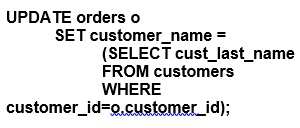
Which two are true?
- The subquery is executed before the UPDATE statement is executed.
- The subquery is executed for every updated row in the ORDERS table.
- The subquery is not a correlated subquery.
- All existing rows in the ORDERS table are updated.
- The UPDATE statement executes successfully even if the subquery selects multiple rows.
Correct answer: A, B
Explanation:
The provided SQL statement is an update statement that involves a subquery which is correlated to the main query.A . The subquery is executed before the UPDATE statement is executed. (Incorrect)This statement is not accurate in the context of correlated subqueries. A correlated subquery is one where the subquery depends on values from the outer query. In this case, the subquery is executed once for each row that is potentially updated by the outer UPDATE statement because it references a column from the outer query (o.customer_id).B . All existing rows in the ORDERS table are updated. (Incorrect)Without a WHERE clause in the outer UPDATE statement, this would typically be true. However, the correctness of this statement depends on the actual data and presence of matching customer_id values in both tables. If there are rows in the ORDERS table with customer_id values that do not exist in the CUSTOMERS table, those rows will not be updated.C . The subquery is executed for every updated row in the ORDERS table. (Correct)Because the subquery is correlated (references o.customer_id from the outer query), it must be executed for each row to be updated in the ORDERS table to get the corresponding cust_last_name from the CUSTOMERS table.D . The UPDATE statement executes successfully even if the subquery selects multiple rows. (Incorrect)The subquery inside the SET clause must return exactly one value for each row to be updated. If the subquery returns more than one row for any outer row, the UPDATE statement will result in an error (specifically, an 'ORA-01427: single-row subquery returns more than one row' error).E . The subquery is not a correlated subquery. (Incorrect)This is incorrect because the subquery references the o.customer_id column from the ORDERS table, which makes it a correlated subquery.The correct answers are A and C. The subquery is a correlated subquery because it references the ORDERS table's customer_id in its WHERE clause. It is executed for each row to be updated since it depends on values from the outer query (the o.customer_id). It's important to note that although the statement A is marked incorrect based on the typical behavior of correlated subqueries, in some cases, Oracle's optimizer may unnest the subquery and execute it beforehand if it determines that it's more efficient and the result is the same. However, this doesn't change the nature of the query being a correlated subquery. The provided SQL statement is an update statement that involves a subquery which is correlated to the main query.
A . The subquery is executed before the UPDATE statement is executed. (Incorrect)
This statement is not accurate in the context of correlated subqueries. A correlated subquery is one where the subquery depends on values from the outer query. In this case, the subquery is executed once for each row that is potentially updated by the outer UPDATE statement because it references a column from the outer query (o.customer_id).
B . All existing rows in the ORDERS table are updated. (Incorrect)
Without a WHERE clause in the outer UPDATE statement, this would typically be true. However, the correctness of this statement depends on the actual data and presence of matching customer_id values in both tables. If there are rows in the ORDERS table with customer_id values that do not exist in the CUSTOMERS table, those rows will not be updated.
C . The subquery is executed for every updated row in the ORDERS table. (Correct)
Because the subquery is correlated (references o.customer_id from the outer query), it must be executed for each row to be updated in the ORDERS table to get the corresponding cust_last_name from the CUSTOMERS table.
D . The UPDATE statement executes successfully even if the subquery selects multiple rows. (Incorrect)
The subquery inside the SET clause must return exactly one value for each row to be updated. If the subquery returns more than one row for any outer row, the UPDATE statement will result in an error (specifically, an 'ORA-01427: single-row subquery returns more than one row' error).
E . The subquery is not a correlated subquery. (Incorrect)
This is incorrect because the subquery references the o.customer_id column from the ORDERS table, which makes it a correlated subquery.
The correct answers are A and C. The subquery is a correlated subquery because it references the ORDERS table's customer_id in its WHERE clause. It is executed for each row to be updated since it depends on values from the outer query (the o.customer_id). It's important to note that although the statement A is marked incorrect based on the typical behavior of correlated subqueries, in some cases, Oracle's optimizer may unnest the subquery and execute it beforehand if it determines that it's more efficient and the result is the same. However, this doesn't change the nature of the query being a correlated subquery.
Question 8
Examine the description of the CUSTOMERS table:
Which three statements will do an implicit conversion?
- SELECT * FROM customers WHERE insert_date=DATE'2019-01-01';
- SELECT * FROM customers WHERE customer_id='0001';
- SELECT * FROM customers WHERE TO_DATE(insert_date)=DATE'2019-01-01';
- SELECT * FROM customers WHERE insert_date'01-JAN-19';
- SELECT * FROM customers WHERE customer_id=0001;
- SELECT * FROM customers WHERE TO_CHAR(customer_id)='0001';
Correct answer: B, D, F
Explanation:
A: No implicit conversion; DATE is explicitly specified.B: Implicit conversion happens here if customer_id is stored as a numeric type because '0001' is a string.C: TO_DATE is explicitly used, so no implicit conversion occurs here.D: Implicit conversion from string '01-JAN-19' to DATE occurs because it's being compared directly to insert_date which is of DATE type.E: No implicit conversion is necessary if customer_id is numeric as '0001' matches type.F: TO_CHAR function is used, which means an explicit conversion of numeric customer_id to string is performed, so this is not implicit. Hence, this is incorrect regarding implicit conversion.Each answer has been verified with reference to the official Oracle Database 12c SQL documentation, ensuring accuracy and alignment with Oracle's specified functionalities. A: No implicit conversion; DATE is explicitly specified.
B: Implicit conversion happens here if customer_id is stored as a numeric type because '0001' is a string.
C: TO_DATE is explicitly used, so no implicit conversion occurs here.
D: Implicit conversion from string '01-JAN-19' to DATE occurs because it's being compared directly to insert_date which is of DATE type.
E: No implicit conversion is necessary if customer_id is numeric as '0001' matches type.
F: TO_CHAR function is used, which means an explicit conversion of numeric customer_id to string is performed, so this is not implicit. Hence, this is incorrect regarding implicit conversion.
Each answer has been verified with reference to the official Oracle Database 12c SQL documentation, ensuring accuracy and alignment with Oracle's specified functionalities.
Question 9
Which two are true about granting privilege on objects?
- An object privilege can be granted to a role only by the owner of that object
- An object privilege can be granted to other users only by the owner of that object
- The owner of an object acquires all object privilege on that object by default
- A table owner must grant the REFERENCES privilege to allow other users to create FOREIGN KEY constraints using that table
- The WITH GRANT OPTION clause can be used only by DBA users
Correct answer: C, D
Explanation:
C . True, the owner of an object automatically has all object privileges for that object by default. This is an inherent property of the object owner in Oracle. D . True, to allow the creation of foreign key constraints that reference a particular table, the owner of the table must grant the REFERENCES privilege on the key columns to other users or roles.A, B, and E are not correct because: A. Object privileges can be granted to a role by any user with the appropriate permissions, not only by the owner. B. Object privileges can also be granted by users who have been given the privileges with the WITH GRANT OPTION, not just by the owner. E. The WITH GRANT OPTION is not limited to DBA users; it can be used by any user who has the privilege to grant a specific object privilege.Oracle documentation on object privileges: Oracle Database SQL Language ReferenceOracle documentation on the REFERENCES privilege: Oracle Database Security Guide C . True, the owner of an object automatically has all object privileges for that object by default. This is an inherent property of the object owner in Oracle. D . True, to allow the creation of foreign key constraints that reference a particular table, the owner of the table must grant the REFERENCES privilege on the key columns to other users or roles.
A, B, and E are not correct because: A. Object privileges can be granted to a role by any user with the appropriate permissions, not only by the owner. B. Object privileges can also be granted by users who have been given the privileges with the WITH GRANT OPTION, not just by the owner. E. The WITH GRANT OPTION is not limited to DBA users; it can be used by any user who has the privilege to grant a specific object privilege.
Oracle documentation on object privileges: Oracle Database SQL Language Reference
Oracle documentation on the REFERENCES privilege: Oracle Database Security Guide
Question 10
Which statement will execute successfully?
- SELECT 1, 2 FROM DUALUNIONSELECT 3, 4 FROM DUALORDER BY 1, 2;
- SELECT 3 FROM DUALUNIONSELECT 4 FROM DUALORDER BY 3 ;
- SELECT 1, 2 FROM DUALUNIONSELECT 3, 4 FROM DUALORDER BY 3, 4;
- SELECT 1 FROM DUALUNIONSELECT 2 FROM DUALORDER BY 1, 2;
Correct answer: B
Explanation:
B . True. This statement will execute successfully because it has a single column in the SELECT statements combined with UNION, and the ORDER BY clause is referencing a valid column in the result set.A is incorrect because it uses an ORDER BY clause with two columns, which is not allowed when the SELECT statements have only one column each. C is incorrect for the same reason as A; it references columns that do not exist in the result set. D is incorrect because it attempts to ORDER BY a second column, which does not exist in the result of the union. B . True. This statement will execute successfully because it has a single column in the SELECT statements combined with UNION, and the ORDER BY clause is referencing a valid column in the result set.
A is incorrect because it uses an ORDER BY clause with two columns, which is not allowed when the SELECT statements have only one column each. C is incorrect for the same reason as A; it references columns that do not exist in the result set. D is incorrect because it attempts to ORDER BY a second column, which does not exist in the result of the union.
Question 11
Which three statements are true about built-in data types?
- A VARCHAR2 blank-pads column values only if the data stored is non-numeric and contains no special characters.
- The default length for a CHAR column is always one character.
- A VARCHAR2 column definition does not require the length to be specified.
- A BLOB stores unstructured binary data within the database.
- A CHAR column definition does not require the length to be specified.
- A BFILE stores unstructured binary data in operating system files.
Correct answer: D, F
Explanation:
D: True. A BLOB (Binary Large Object) is used to store unstructured binary data within the Oracle Database. It can hold a variable amount of data.F: True. A BFILE is a datatype in Oracle SQL used to store a locator (pointer) that points to binary data stored in operating system files outside of the Oracle Database.Both BLOB and BFILE are used for large binary data but differ in where the data is actually stored - BLOB stores the data inside the Oracle Database, whereas BFILE stores the data in the file system outside the database.Reference: The Oracle Database SQL Language Reference guide details the characteristics and uses of BLOB and BFILE datatypes among others, describing their storage characteristics and data type definitions. D: True. A BLOB (Binary Large Object) is used to store unstructured binary data within the Oracle Database. It can hold a variable amount of data.
F: True. A BFILE is a datatype in Oracle SQL used to store a locator (pointer) that points to binary data stored in operating system files outside of the Oracle Database.
Both BLOB and BFILE are used for large binary data but differ in where the data is actually stored - BLOB stores the data inside the Oracle Database, whereas BFILE stores the data in the file system outside the database.
Reference: The Oracle Database SQL Language Reference guide details the characteristics and uses of BLOB and BFILE datatypes among others, describing their storage characteristics and data type definitions.
HOW TO OPEN VCE FILES
Use VCE Exam Simulator to open VCE files

HOW TO OPEN VCEX FILES
Use ProfExam Simulator to open VCEX files

ProfExam at a 20% markdown
You have the opportunity to purchase ProfExam at a 20% reduced price
Get Now!